I was recently doing some roaming testing on WPA3 and uncovered some useful visualizations on how OS version and application types affect roaming. It has been common knowledge in the WiFi industry that clients have a lot of say in how they roam. These tests really uncovered how true that statement is - also, how little changes in how the device is configured or even how it’s being used can have big changes to roaming behavior.
The test
I used one Zebra TC53 and changed only two things: the Android version (11 or 14) and what the device was doing (a regular shopping app or a VoIP call). That gave me four scenarios:
- Android 11 using a regular shopping app
- Android 11 on a VoIP call
- Android 14 using a regular shopping app
- Android 14 on a VoIP call
Everything else stayed the same:
- Device: the exact same Zebra TC53
- Location: the exact same grocery store, which has high AP density
- Path: I walked the exact same path every time
- Applications: the exact same apps every time
- Network: WPA3 with EAP-TLS, and 802.11k/r/v enabled on 5 GHz
Each run is a capture of the client’s uplink frames, so the chart shows the client’s RSSI over time, the probing it did before roaming, and every roam event. All device and AP identifiers are anonymized.
Explore the data
Use the dropdown to switch between the four scenarios. Hover over the chart to inspect individual samples, probes and roams. If the embed doesn’t work for you, open it in its own tab, or skip down to the screenshots in the appendix.
What I saw
Android 11, shopping app
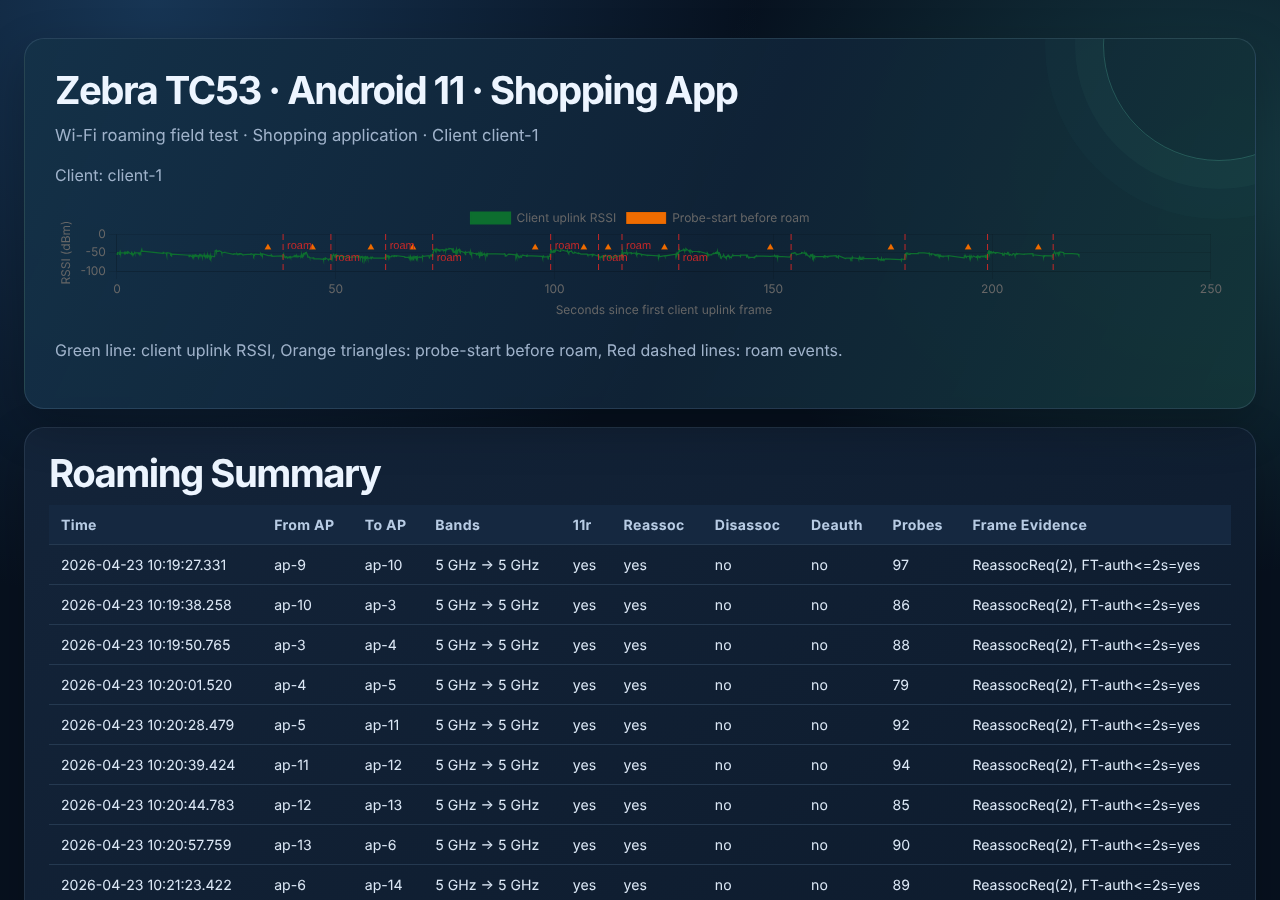
This one looks like a textbook roam. Twelve roams in about 220 seconds, all 5 GHz to 5 GHz, and every one used 802.11r with a reassociation. No disassociations and no deauths. The capture shows the Fast Transition authentication frame within two seconds on every roam.
The client was also very active before each roam. The probes column shows between 79 and 103 probes per roam, around 90 on average.
Android 14, shopping app
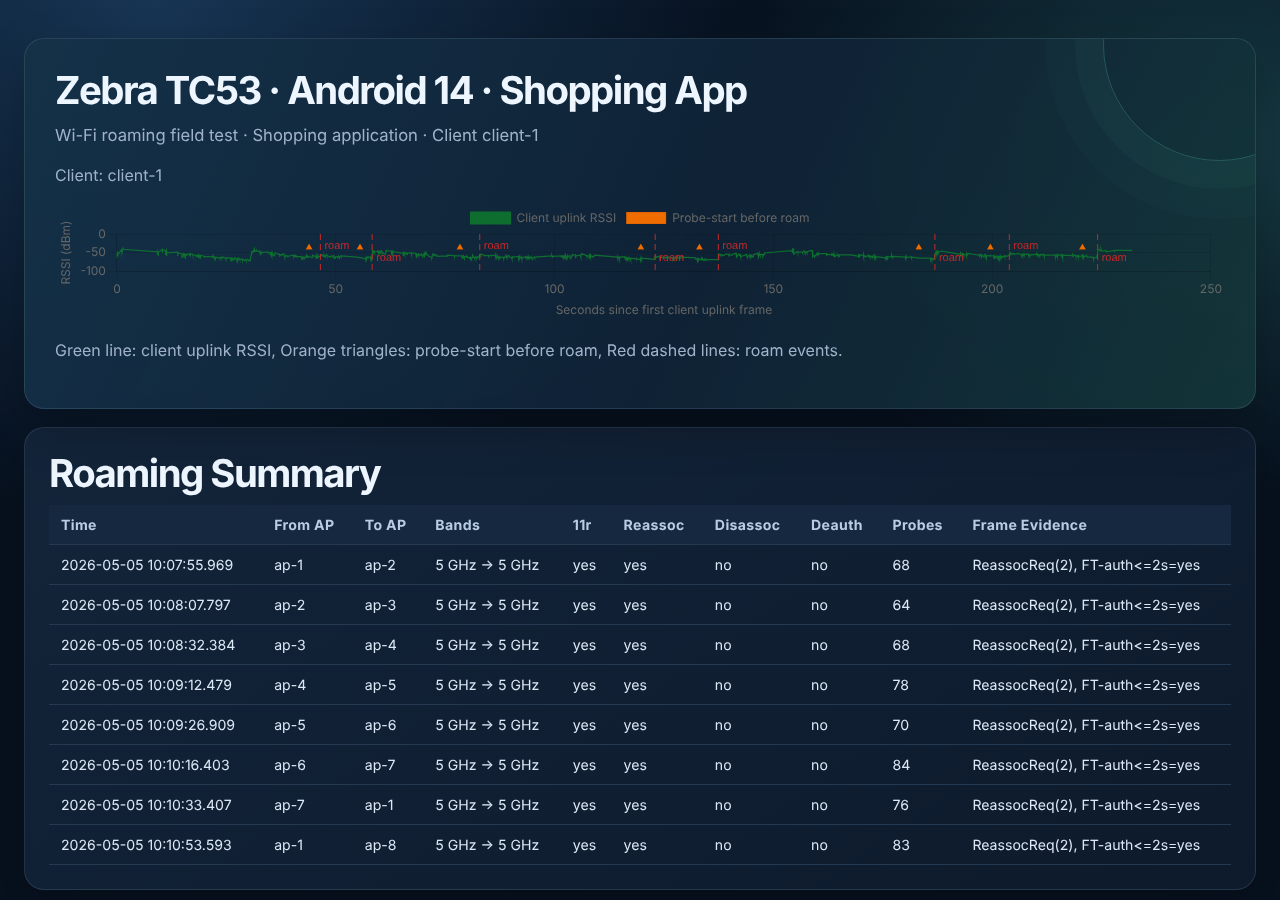
Same clean pattern: every roam was 5 GHz to 5 GHz, with 11r and a reassociation, and no disassociations or deauths. The difference is how many times it roamed. I got eight roams in about 232 seconds, compared with twelve in about 220 seconds on Android 11, walking the same path. The probe counts were lower too, between 64 and 84 per roam, around 74 on average.
Android 14, VoIP call
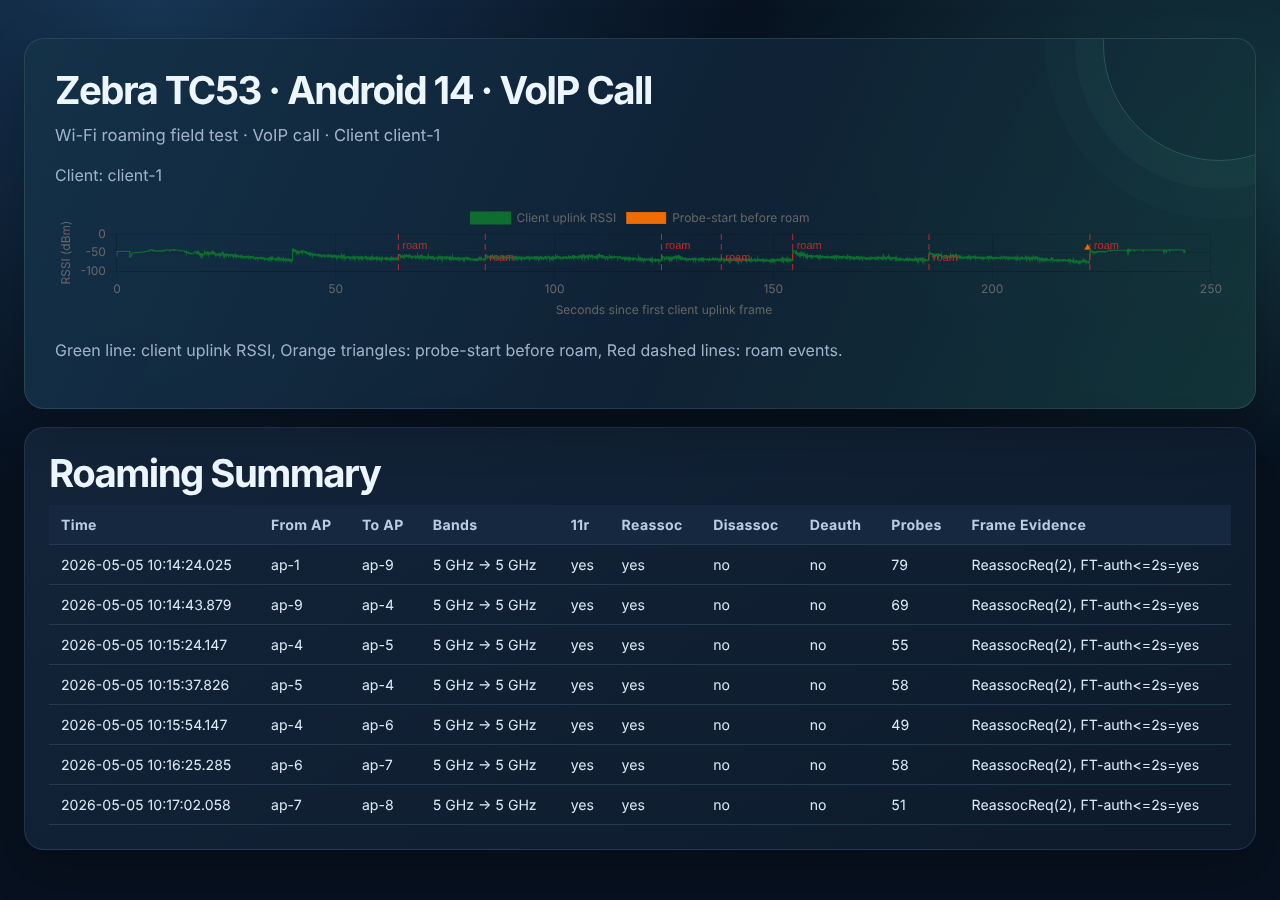
Still clean. All seven roams used 11r with a reassociation, with no disassociations or deauths. Probing dropped again, between 49 and 79 per roam, around 60 on average. There was also one little ping-pong: the client went from ap-4 to ap-5 and then back to ap-4 about 14 seconds later before moving on to ap-6.
The signal was a little lower at the moment of the roam on this one. The median RSSI in the three seconds before each roam averaged about -69 dBm, compared with about -64 dBm for the Android 14 shopping app and about -61 dBm for the Android 11 shopping app.
Android 11, VoIP call
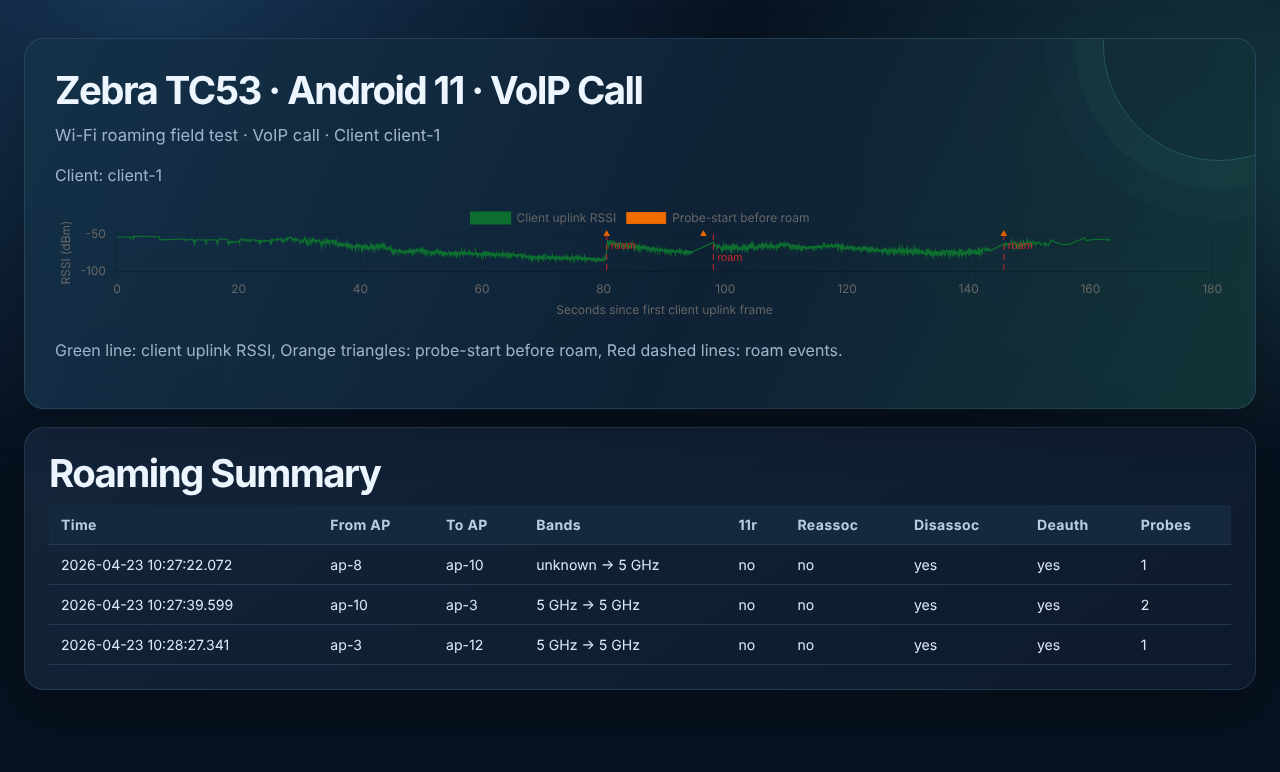
This is the one that stands out. Only three roams in about 163 seconds, and none of them used 11r. No Fast Transition and no reassociation. Instead, every roam shows a deauth. The client also barely probed: one or two probes per roam, compared with 50 to 100 in the other three runs.
The deauths here aren’t a roam in the way we normally think of one. The client was no longer able to pass traffic on its WiFi connection, so the OS forcibly disconnected it. The “roam” you see is the device rediscovering the network and connecting again.
It also stayed on an AP for a long time while the signal got bad. The RSSI dropped to -86 dBm at the lowest point, and the first roam happened with the signal around -84 dBm. For comparison, the lowest RSSI in the Android 11 shopping run was -71 dBm.
Why would a VoIP call make the device so reluctant to roam? The main theory is that the call itself is influencing the device not to roam, because it suspects a roam will interrupt the call. My guess is that this is old logic from when networks were designed for coverage and didn’t have fast roaming mechanisms like 802.11r. That’s a theory, not something this test proves, but it fits what the data shows: the client held on to a weak AP until the connection broke.
Takeaways
- The infrastructure was identical, but the roaming wasn’t. 11k/r/v was enabled, but it was only used on three of the four runs. Having 802.11r turned on doesn’t guarantee the client will use it for every app on every OS version.
- The app matters as much as the OS. Android 11 roamed cleanly with the shopping app and very differently on the VoIP call. If I had only tested one app, I would have told you the wrong story about Android 11.
- Test with the apps your users really run. A roam that looks great with a web browser or a shopping app doesn’t tell you anything about voice. The VoIP call is the scenario where a slow or sticky roam hurts the most, and it’s the one that has to be tested.
- Look at the frames. The capture is what shows whether a roam was a Fast Transition with a reassociation or a forced disconnect followed by a full reconnect, which is a very different experience for the client.
Keep in mind this is one device, one store and one walk for each scenario, so treat it as a data point and not a rule. If you’ve seen the same on other devices or OS versions, I’d like to hear about it.
Questions or comments? Find me on LinkedIn
Appendix: the four runs
If the interactive version above doesn’t work for you, here are the four runs as images. Each one shows the client’s RSSI over time, the probe-start markers and the roam events, with the roam table underneath.
Android 11, shopping app
Android 11, VoIP call
Android 14, shopping app
Android 14, VoIP call